Inmanta Lifecycle Service Manager
The Inmanta LSM is an active component that governs the lifecycle of services in the orchestration model. LSM extends the Orchestration Engine (OrE) and Resource Controller (ResC) with a service catalog, a service inventory and a lifecycle manager.
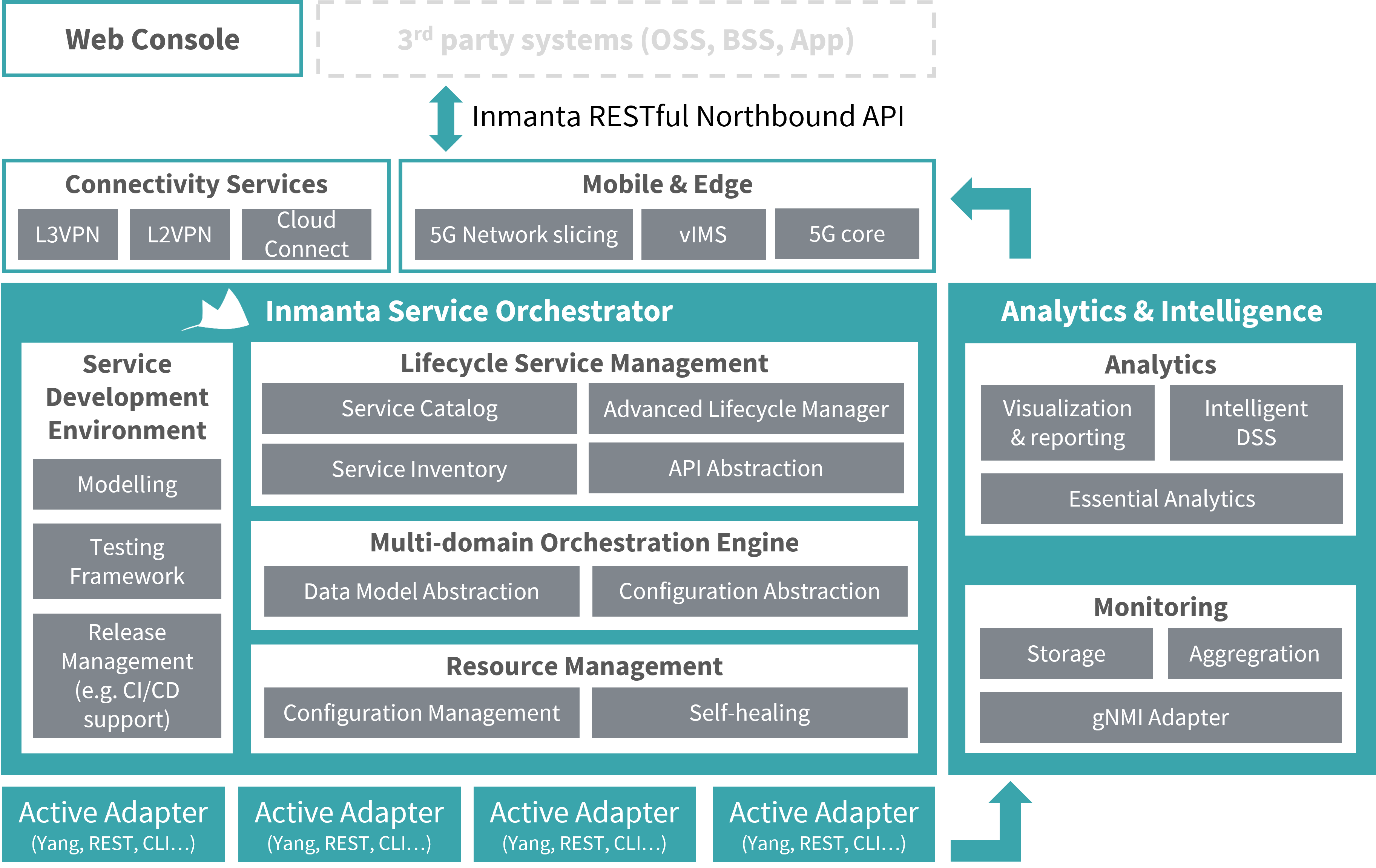
The Resource Controller manages the low level desired state of individual resources in the managed infrastructure. This desired state is defined by the orchestration engine. The orchestration engine is responsible for the translation of high level desired state into low level desired state, based on a library of refinements.
The LSM makes the orchestator service aware: the orchestration engine can control the refinement process per service instance and change the refinement process based on external events.
Service catalog
The service catalog contains all defined service entities. A service entity models a service offered by the infrastructure. A service entity is the definition of the service: its attributes and the lifecycle of the service. A service entity is created by marking an inmanta entity in a service model as a service entity and associate it with a service lifecycle. The orchestration layer will take care of defining and maintaining the definition in the service catalog.
A service entity models the following properties for a service:
The name of the service entity
- A list of attributes that have a name, a type (number, string, …) and a modifier. This modifier determines whether the attribute is:
r/ readonly: readonly from the client perspective and allocated server side by the LSMrw/ read-write: Attributes can be set at creation time, but are readonly after the creationrw+/ read-write always: Attribute can be set at creation time and modified when the service state allows it
The State machine that defines the lifecycle of the service.
For each service entity the lifecycle service manager will create an REST API endpoint on the service inventory to perform create, read, update and delete (CRUD) service instances of service entities.
Creating service entities
Service entities are entities that extend lsm::ServiceEntity.
We define attributes for the service entity the same way as for entities. We can also define a modifier for the attribute.
If no modifier is defined for an attribute, it will be rw by default.
Here is an example of an entity definition where the modifier of the address attribute is set to rw+.
 1import lsm
 2import lsm::fsm
 3
 4entity InterfaceIPAssignment extends lsm::ServiceEntity:
 5    """
 6        Interface details.
 7
 8        :attr service_id: A unique ID for this service.
 9
10        :attr router_ip: The IP address of the SR linux router that should be configured.
11        :attr router_name: The name of the SR linux router that should be configured.
12        :attr interface_name: The name of the interface of the router that should be configured.
13        :attr address: The IP-address to assign to the given interface.
14    """
15    string service_id
16
17    string router_ip
18    string router_name
19    string interface_name
20
21    string address
22    lsm::attribute_modifier address__modifier="rw+"
23
24end
25
26index InterfaceIPAssignment(service_id)
27
28implement InterfaceIPAssignment using parents
We also need to add a lifecycle and a name to the service. This is done by creating an instance of the ServiceEntityBinding entity:
30binding = lsm::ServiceEntityBindingV2(
31    service_entity="__config__::InterfaceIPAssignment",
32    lifecycle=lsm::fsm::service,
33    service_entity_name="service_simple",
34)
35
36for instance in lsm::all(binding):
It’s also possible to define a service identity for a service. For more information, see Service Identity.
Service Inventory
The service inventory provides an inventory with all service instances per service entity defined in the catalog. The inventory provides operations to create and delete the service instance and to update the attributes of the service instance. Additionally, it governs the lifecycle of the instance as defined in the lifecycle registered in the service catalog.
The full swagger api for all available services is served at http://<host>:<port>/lsm/v1/service_catalog_docs?environment=<env_id>.
The following operations are available for each service:
CRUD operations
The service inventory exposes CRUD operations on service instances in the inventory through a RESTful API:
POST /lsm/v1/service_inventory/<service_entity>: Create a new service instance of type <service_entity>.GET /lsm/v1/service_inventory/<service_entity>: List all instances of a service entity.GET /lsm/v1/service_inventory/<service_entity>/<service_id>: Get the service instance with idservice_id.PATCH /lsm/v1/service_inventory/<service_entity>/<service_id>: Update the attributes of the service instance with idservice_id(v1 endpoint, requires providing the full tree of attributes (i.e. including those that didn’t change)).PATCH /lsm/v2/service_inventory/<service_entity>/<service_id>: Update the attributes of the service instance with idservice_id(v2 endpoint with finer control (i.e. allows updating subtrees of attributes at the given dictpath expressions)).POST /lsm/v1/service_inventory/<service_type>/<service_id>/state: Request a state transfer for the service instance with idservice_id.DELETE /lsm/v1/service_inventory/<service_entity>/<service_id>: Delete the service instance with idservice_id.
The state machine attached to the lifecycle will determine whether the API call is successful or not.
Concurrency control
Every service instance carries an integer version field, which is returned by every read operation. This version is a
change counter: it is incremented on every state transfer of the instance. It is not a version control mechanism like
git: older versions are not kept as retrievable snapshots, so the version number cannot be used to check out, diff or
restore a previous state of the instance. To inspect the history of an instance, use the log endpoint listed under
Status operations. To revert attribute changes, perform a new update with the old attribute values, or use a lifecycle
transfer with the rollback operation (see State machine).
Instead, the version is used for optimistic concurrency control. A service instance can be modified by multiple actors at the same time: operators using the web console, northbound clients such as OSS/BSS systems, and the lifecycle manager itself, which moves instances through their lifecycle with automatic state transfers. Any of these can change the instance between the moment a client reads it and the moment that client sends a modification.
Every API call that modifies a service instance (attribute updates, state transfers and deletes) therefore takes a
current_version argument: the version of the instance the caller based its decision on. The call is only executed if
this value still matches the version of the instance in the inventory. If it does not match, the instance is left
untouched and the request is rejected with HTTP 409 (Conflict) and an error like:
The given current version (4) doesn't match the actual current version (5) of service instance
8ee3a5e8-... in environment test(f2568cdb-...)
On the endpoints listed above, current_version is mandatory. Endpoints on which it is optional (such as the expert
variants of these operations) skip the version check when it is not provided: the operation is then applied to the
instance as it is at the moment the request is processed, regardless of any changes made since the caller last read it.
This compare-and-set mechanism prevents lost updates and modifications based on stale data. Consider a connectivity
service with a bandwidth attribute that is managed by a BSS system:
The BSS reads the service instance to prepare a bandwidth upgrade: the instance is in state
upat version 12.Before the BSS sends its update, a port failure in the network causes a deploy of the instance’s resources to fail. The lifecycle manager reacts with an automatic state transfer from
uptofailed: the instance is now at version 13.The BSS sends its update with
current_versionset to 12. The instance is no longer at version 12, so the request is rejected with a 409 and the instance is not modified.The BSS reads the instance again, sees that it is in state
failed, and can make an informed decision: raise an alarm, wait for the service to recover, or apply the upgrade anyway withcurrent_versionset to 13.
Without the version check, the update in step 3 would have been accepted, and the BSS would believe it upgraded a healthy service while it actually modified a degraded one. The same mechanism protects two API clients that update the same instance concurrently: both may base their update on the same version, but only the first update will be accepted. Because the v1 update endpoint requires the full tree of attributes, the second update would otherwise silently undo the first one (a lost update).
Clients are therefore expected to interact with the API as follows:
GETthe service instance and remember itsversion.Decide on the modification, based on the attributes and state that were just read.
Send the modifying call with
current_versionset to the version from step 1.On a 409 response, the instance was changed by another actor in the meantime. Read the instance again, verify that the modification still makes sense for the new attributes and state, and retry with the new version. Do not blindly resend the request with the version reported in the error message.
For example, updating the attributes of an instance that is currently at version 4:
# 1. read the instance, the response contains "version": 4
curl -H "X-Inmanta-tid: $ENV_ID" \
    "http://<host>:<port>/lsm/v1/service_inventory/vlan_assignment/$INSTANCE_ID"

# 2. update it, passing the version this update was based on
curl -X PATCH -H "X-Inmanta-tid: $ENV_ID" -H "Content-Type: application/json" \
    "http://<host>:<port>/lsm/v1/service_inventory/vlan_assignment/$INSTANCE_ID" \
    -d '{"current_version": 4, "attributes": {"description": "updated description"}}'
A successful modification triggers a state transfer, so it increments the version of the instance (possibly multiple
times, as automatic transfers follow). A read can also assert the version: GET on a single service instance accepts an
optional current_version parameter, which turns a stale read into a 409 error.
Configuration operations
The following endpoints set or retrieve the config of a given service instance:
POST /lsm/v1/service_inventory/<service_entity>/<service_id>/config: Set the config of the service instance with idservice_id.GET /lsm/v1/service_inventory/<service_entity>/<service_id>/config: Get the config of the service instance with idservice_id.
Status operations
The following endpoints give information about the status of a given service instance:
GET /lsm/v1/service_inventory/<service_entity>/<service_id>/log: Get a list of all log records for a certain service instance.GET /lsm/v1/service_inventory/<service_entity>/<service_id>/events: Get a list of all events for a certain service instance.GET /lsm/v1/service_inventory/<service_entity>/<service_id>/resources: Get the list of resources that determine the state of the service.GET /lsm/v1/service_inventory/<service_entity>/<service_id>/diagnose: Diagnose rejection or failure of a service entity.
Lifecycle Manager
State machine
The lifecycle of service instance is governed by a state machine. A state machine is represented as a directed graph: the nodes represent the different service states and the edges represent the possible transfers that are allowed. The states determine how the service instance is treated in the orchestration engine and the transfers determine what operations are possible on a service instance.
Each service instance is in a state defined in the lifecycle state machine attached to the service entity. The state defines how the orchestration engine handles that specific service instance in its refinement process. The orchestration engine can refine a full orchestration model in two modes:
validation: It validates the orchestration model but does not generate a resource model for the resource controller.
production: It validates the orchestration model and generates a resource model that the resource controller deploys and enforces on the managed infrastructure.
The value of the model_state attribute of the state determines how the service instance is handled by the orchestration
engine:
inactive: never include this instance in the orchestration model.candidate: include the instance in validation mode. In validation mode the candidate set of attributes are used. Only this candidate and all designed and active instances are included in the orchestration model.designed: this indicates a candidate is accepted and is queued to become active in the model. It is included in validation mode but its resources are not yet pushed to the resource controller. The orchestration engine uses the candidate attribute set.active: include in both modes (validate and production). The orchestration engine uses the active attribute set.
Once a service instance goes to active the lifecycle should also support updates. A service instance has three sets of attributes to support this: candidate, active and rollback. When the service instance is in candidate and designed mode but it has attributes in the active set, they are included in production mode with their active attribute set. The target_operation and error_operation action on state transfers control the contents of these attribute sets. These operations are discussed later on.
Transfers between states determine how the lifecycle of the service instance reacts on external events. Each transfer has a source state, a target state and an error state. The following events can trigger a state transfer:
the creation of the service instance: The state of the new service instance is set to the start state defined in the state machine. Set attributes provided with the API call are stored in the candidate_attributes set of the instance.
auto: This transfer is automatically performed when the lifecycle arrives in the source state. Auto transfers can be disabled by adding a configuration option.api_set_statecall: When a set state API call is performed with matching source and target stateson_update: Transfers marked as on_update are executed when a PATCH is performed on a service instance. The update attributes are stored based on the target_operation or error_operation attribute.on_delete: Transfers marked as on_delete are executed when a DELETE is performed on a service instance.resource based: This transfer is triggered when the orchestrator finishes deploying the resources that this service instance consists off.
It is important to note that a service instance can only be updated (through either the API or the frontend)
if it is in a lifecycle state that supports updates (i.e. the state has a transfer marked as on_update). In the same
way, a service instance can only be deleted in a state that has a lifecycle transfer marked as on_delete.
The auto and api set state call can set the validation attribute to true. When this attribute is true, the orchestration engine refines the model in validation mode. When the validation succeeds the state transfers to the target state, if the validation fails the state transfers to the error state.
On each transfer the lifecycle manager can apply operations to the three attribute sets. These operations can be defined on a transfer to target with target_operation or to error with error_operation. On creation and update the attributes provided through the API are stored in candidate_attributes. For all other transitions the following operations are available:
clear <setname>: Clear the given attribute set. Setname is one of the following: candidate, active or rollbackpromote: Promote the values in candidate to active and active to rollback.rollback: Do a roll back of the attributes by setting the values from rollback to active and active to candidate.
On every state transfer the version of the service instance is incremented. This version is used for concurrency control on the API (see Concurrency control).
Patterns
Validating with intermediary state
Batched with on error serial
Glossary
- lifecycle
A formal description of all the states a service instance can be in, between creation and deletion and the possible transfers between the states.
- service entity
In the Inmanta lifecycle service manager multiple service entities are registered from an orchestration model. A service entity defines the attributes of a service instance and the lifecycle state machine.
- service instance
The lifecycle manager manages the lifecycle of service instance.
- state
A service instance is always in a state defined in the lifecycle state machine. This state determines how the service instance behaves.
- state machine
The lifecycle of a service is modelled as a state machine. This state machine consists of states the service can be in and transfers from a source state to a destination state.
- transfer
A state transfer from one state to another. Transfers are used to connect events with a state transfer.
- trigger
A trigger is an external event that causes a service instance to transfer to a next state in its lifecycle. A trigger can be an external API call or the orchestrator finishing a deploy of the resources the service consists of.
Dict Path Library
This extension also uses the Dict Path library. This library can be used to extract or modify specific elements from an arbitrary location in a nested dictionary-based data structure.
Partial Compiles
Partial compiles are an advanced feature that allow increased scaling in the number of services. Instead of triggering compiles for the full model whenever a service instance is created, updated or has a state transfer, only the part of the model relevant for that service instance is recompiled.
LSM expands on the normal resources set based partial compiles by automatically creating a single
resource set for each service instance. To add resources to the instance’s resource set, simply add them to its
owned_resources relation and make sure to select the parents implementation for your service entities. LSM will then
make sure to populate the resource set and to correctly trigger related compiles and exports.
For more advanced scenarios, refer to the lsm partial compile section.
For a more generic introduction to partial compiles (without lsm), including resource set semantics, modelling guidelines and how to approach testing, refer to the generic partial compiles section.
Finally, to enable lsm’s partial compiles on the server, set the lsm_partial_compile
environment setting to true.