Architecture
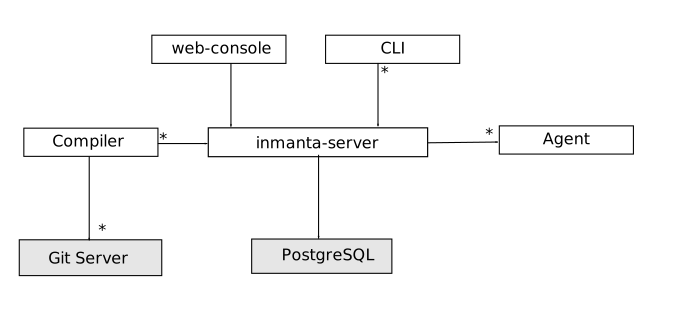
The Inmanta server: This server manages the deployment process, it keeps track of all ongoing work. The server stores its state in PostgreSQL. All other state can be recovered after a server restart or failover.
A PostgreSQL database: The Inmanta server stores its state in a PostgreSQL database.
Environment: For multi-tenancy, one server can have multiple environments. Each environment performs its own deployments, without relation to other environments.
The compiler: The compiler converts the source code into deployable resources and exports it to the server.
CLI and web-console: To control the server, you can use either the web-console or the command line tools. Both communicate through the server rest API.
The scheduler: The scheduler manages the deployment process for one specific environment.
The executors: The executors execute configuration changes on targets. A target can be a server, a network device, an API or a cloud service. The scheduler will create as many executors as it requires.
Smart Adapters: to be able to interface with target devices, the executors load smart adapters, that allows the executor to communicate with the target device and enforce desired state on it.
Resource deployment
The scheduler deploys resources (through the executors and the smart adapters) in 5 ways:
Deployment of changes: when the intent (desired state) on the server changes, the scheduler will instruct the executors to update the infrastructure using the smart adapters.
Self-healing: when a resource has not been verified by the server for some time, it will verify the intent still holds. If it doesn’t the intent is restored. This ensures that the managed infrastructure doesn’t deteriorate over time.
Retry: when a deployment has previously failed, the scheduler will periodically retry all failed deploys.
User initiated deploy. The scheduler will immediately retry all previously failed resources.
User initiated repair. The scheduler will immediately perform self-healing on all resources.
Because of the intent based approach of the Inmanta orchestrator, the deployment code used in all 5 steps is the same. Also, onboarding of existing configuration is no different from a new deployment or self-healing: if we find that the system is already correctly configured, we leave it as is.
Additionally, we can perform dryrun on all intent, to determine what would change if we would deploy an intent. This also uses the same smart adapter, but stops before actually enforcing the intent.
The compile-export-deploy pipeline
The end-to-end flow from source code to deployed infrastructure follows these stages:
Compile: The compiler reads the project’s
main.cffile and all imported modules. It evaluates the declarative model, resolving all entities, relations, implementations, and plugins into a complete resource model. The compiler determines which entities have@resourcemappings and serializes them into deployable resources.Export: The exporter takes the compiled resource model and sends it to the Inmanta server via its REST API. Each resource is serialized to a JSON representation that captures all attributes needed for deployment. Resources with unknown values are marked as undefined and excluded from deployment until those values become known.
Store: The server stores the new desired state in its PostgreSQL database. It compares the new desired state with the previous version to determine which resources have changed.
Schedule: The resource scheduler detects changes and schedules deployments. It respects the
requires/providesordering between resources, ensuring dependencies are deployed first. Resources are grouped by their agent, and the scheduler spawns executor processes as needed.Deploy: Each executor loads the appropriate handler (smart adapter) for its assigned resources. The handler reads the current state from the target infrastructure, computes the difference with the desired state, and applies the necessary changes. Results are reported back to the server.
This pipeline runs both for initial deployments and for ongoing changes. When the model is updated and recompiled, only the resources that have actually changed are redeployed.