Attribute and entity metadata
This section describes the metadata fields that can be associated with service entities, embedded entities and its attributes and how these metadata fields can be set in the model.
Attribute description
The attribute description metadata is useful to provide textual information about attributes. This text will be displayed in the service catalog view of the web console.
To add a description to an attribute, create a docstring that documents the attribute. The compiler will pick this up and register it as the description of that attribute.
For example:
entity Interface:
    """ A network interface

        :attr interface_name: The name of the interface
    """
    string interface_name
end
A detailed example can be found here.
Attribute modifier
Adding the attribute modifier metadata lets the compiler know if:
This attribute should be provided by an end-user or set by the orchestrator.
This attribute’s value is allowed to change after creation.
The modifier itself is defined like a regular attribute, with a few caveats:
it should be of type lsm::attribute_modifier.
its name should extend the decorated attribute’s name with the suffix
__modifier.its value should be one of the supported values:
r: This attribute can only be set by an allocator.
rw: This attribute can be set on service instantiation. It cannot be altered anymore afterwards.
rw+: This attribute can be set freely during any phase of the lifecycle.
Attributes modifiers can also be specified on relational attributes.
For example:
entity Interface :
    string interface_name
    lsm::attribute_modifier interface_name__modifier="rw+"
end
A detailed example can be found here.
Annotations
Annotations are key-value pairs that can be associated with an entity (service entity or embedded entity) or an attribute (simple attribute or relational attribute). These annotations don’t influence the behavior of LSM or the Inmanta Service Orchestrator itself, but are intended to pass meta data to other components. For example, they can be used to pass on visualization meta-data to the the web-console to improve the user-experience.
Two key prefixes are reserved: web_* for the web console and inmanta_* for the orchestrator itself. Any other key is free
to use for model authors and for integrations that read the service catalog.
Annotations on entities
Annotations can be attached to an entity using the __annotations attribute. This attribute has the type dict and requires a
default value that defines the annotations. Each key-value pair in the dictionary contains respectively the name and the value
of the annotation. The value of an annotation can be any of the simple types (string, float, int, bool), lists and dicts. Note:
These values are the default values of an attribute, therefore they must be constants and cannot include variables, attribute
access or plugins.
The example below illustrates how the annotation annotation=value can be set on on a service entity. Annotations can be set on
embedded entities in the same way.
entity Interface extends lsm::ServiceEntity:
    string interface_name
    dict __annotations = {"annotation": "value"}
end
Annotations on simple attributes
Annotations can be attached to simple (non-relational) attributes by defining an attribute of type dict, with a name
<attribute>__annotations, where <attribute> is the name of the attribute the annotations belong to. This attribute needs a
default value containing the attributes. The values of the elements in the dictionary must be strings.
The example below shows how the annotation annotation=value is set on the attribute interface_name. Annotations can be set
on simple attributes of embedded entities in the same way.
entity Interface extends lsm::ServiceEntity:
    string interface_name
    dict interface_name__annotations = {"annotation": "value"}
end
Annotations on relational attributes
Annotations can be attached to a relational attribute by replacing the -- part of the relationship definition with an instance
of the lsm::RelationAnnotations entity. This entity has a dict attribute annotations that represents the annotations that
should be set on the relational attribute. The values of this dictionary must be strings. By convention the name of the
lsm::RelationAnnotations instance should be prefixed and suffixed with two underscores. This improves the readability of the
relationship definition.
The example below illustrates how the annotation annotation=value can be attached to the relational attribute ports.
entity Router extends lsm::ServiceEntity:
    string name
end

entity Port extends lsm::EmbeddedEntity:
    number id
end

__annotations__ = lsm::RelationAnnotations(
    annotations={"annotation": "value"}
)
Router.ports [0:] __annotations__ Port._router [1]
Annotations on lifecycle states and transfers
The states and transfers of a lifecycle can carry annotations as well. They are set with the __annotations attribute on the
lsm::State and lsm::StateTransfer instances that make up the lifecycle. This requires version 4.1.0 or later of the lsm
module.
Unlike entity and attribute annotations, these are read from the constructed instance instead of from a default value on the
entity definition. Their values therefore do not have to be constants: anything that evaluates to a dict at compile time can
be used, including variables and plugin calls.
The keys recognized by the web console are listed below. The orchestrator does not validate them: a key it does not know is stored and returned unchanged, and the web console ignores it.
State presentation
Annotation |
Effect |
|---|---|
|
Text shown for the state, instead of the raw state name. |
|
Font awesome icon shown on the state badge. |
|
Text shown in a tooltip when the state badge is hovered. |
These apply wherever the web console shows a lifecycle state: the State column of the service inventory, the state history of a service instance and the lifecycle table of the service entity in the service catalog.
For example, this state is shown as a badge labelled Up, with a check-circle icon, and explains itself on hover:
up = lsm::State(
    name="up",
    label="success",
    export_resources=true,
    __annotations={
        "web_label": "Up",
        "web_icon": "FaCheckCircle",
        "web_description": "The service is deployed and operational.",
    },
)
The text and the icon of the badge come from the annotations. Its colour keeps coming from the label attribute of the state,
which is unrelated to web_label.
Transfer presentation
An api_set_state transfer out of the current state of an instance is offered as an entry in the Actions menu of that
instance, both in the inventory and on the instance details page. These annotations control how that entry looks and behaves:
Annotation |
Effect |
|---|---|
|
Text of the menu entry. |
|
Font awesome icon on that entry. |
|
|
|
When |
|
Text of the confirmation prompt shown before the transfer is executed. |
|
|
For example, this transfer out of the up state above:
setting_start = lsm::State(name="setting_start", export_resources=true, validate_self="candidate")

push_settings = lsm::StateTransfer(
    description="up to setting_start",
    source=up,
    target=setting_start,
    api_set_state=true,
    error=null,
    __annotations={
        "web_button_label": "Push settings",
        "web_icon": "FaSlidersH",
        "web_button_type": "secondary",
        "web_button_variant": "warning",
        "web_confirm": "Push the current settings to the running service?",
        "web_advanced_state": true,
    },
)
web_advanced_state keeps the entry out of the main list, web_button_label names it, web_icon gives it the sliders icon
and web_button_variant colours it:
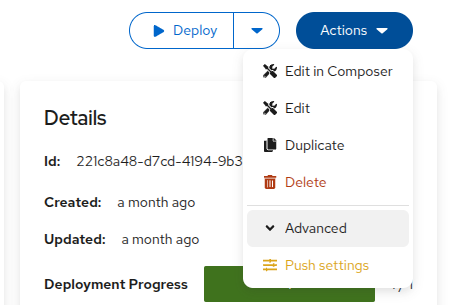
and web_confirm supplies the prompt that is shown when it is selected:
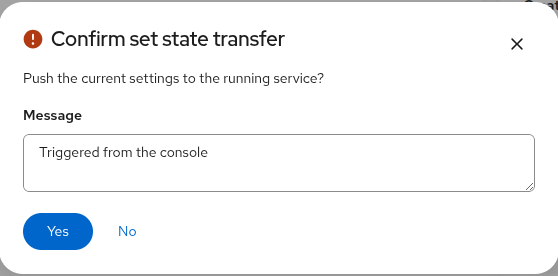
A few things to keep in mind:
When
web_button_labelis not set, theweb_labelof the target state is used as the label of the menu entry, and otherwise the name of the target state.web_confirmreplaces the text of the default confirmation prompt. It does not add or remove the message field that the set-state prompt already has.web_button_typehas no effect on the menu entry itself, only on the documentation tab button described below. All entries of the Actions menu are rendered the same way.The other annotations only have an effect on transfers with
api_set_stateset totrue, because those are the only ones an operator invokes by name. The one exception isweb_confirmon the transfer withon_deleteset totrue: that is the prompt of the delete confirmation for an instance in that state. On a transfer withon_updateit currently has no effect, because updating an instance opens the edit form instead of a confirmation dialog.web_advanced_stateis a presentation hint, not a permission: the transfer stays available through the API and remains one click away in the web console. It is meant to declutter the menu of a state with many transfers, not to protect an operation.
Documentation tabs
Annotations can be used to have the web console render the content of one or more attributes in a tab called Documentation. This can be used to document and explain details of the service to the user based on information in the orchestration model. The attribute value is set during a compile. For example, the following LSM service orchestrates container based labs and provides an overview of all the different services and devices in the lab.
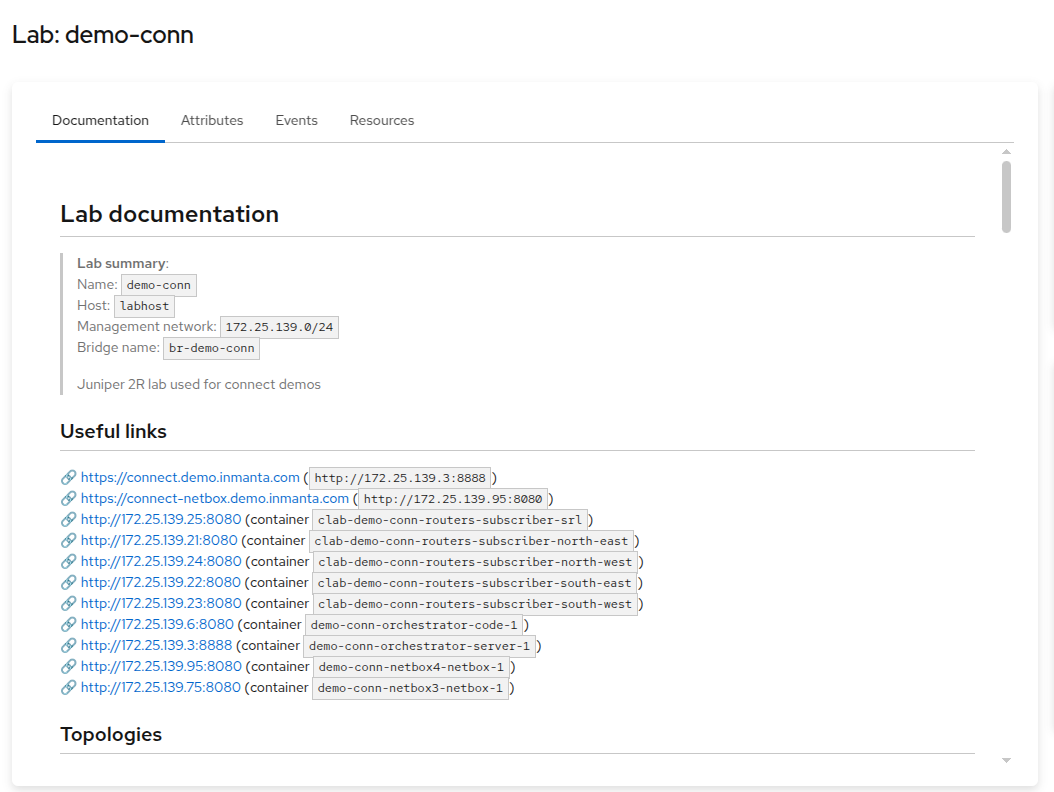
One or more attributes at the root level can be used and they are all rendered in the documentation tab. In the example the documentation is defined as follows:
entity Service extends lsm::ServiceBase:
    string documentation = "# Lab documentation"
    lsm::attribute_modifier documentation__modifier = "r"
    dict documentation__annotations = {
        "web_presentation": "documentation",
        "web_title": "Lab overview",
        "web_icon": "FaInfo",
    }
end
An attribute of type string needs to be defined. We recommend to give it a default value so that the tab is not empty when the documentation has not yet been generated by the compiler.
The attribute modifier must be
rwhich means that it is not defined by the user and only by the orchestrator.Annotations are used to control how the attribute is rendered in the web console:
web_presentationis set todocumentationOptionally
web_titleis set to the title that is shown in the tab. This title is only used when multiple attributes are defined as documentation. This title will be used on the card that contains the content of this attribute.Optionally
web_iconspecifies a font awesome icon name (the second part withoutfa, for exampleFaTv). This icon is also only used when multiple attributes are defined as documentation.
In the orchestration model a call to lsm::update_read_only_attribute is used to upload the content of the documentation tab.
For example:
instance.documentation = lsm::update_read_only_attribute(
    instance,
    "documentation",
    value=std::template(
        "./documentation.md.j2",
        instance=instance,
    ),
)
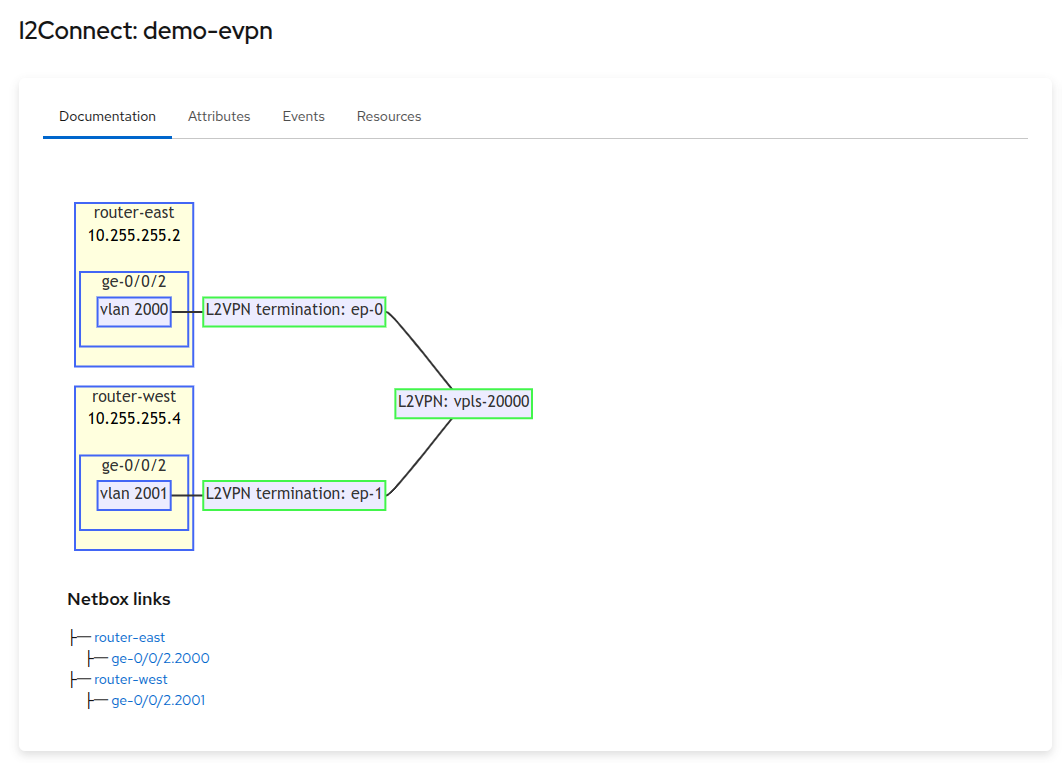
The content of the attribute should be valid markdown. It also supports mermaid diagrams inside the markdown. For example the following documentation tab is generated in a template:
```mermaid
    flowchart LR
    %%{init:{'flowchart':{'nodeSpacing': 20, 'rankSpacing': 10, 'padding': 5}}}%%
    classDef infra stroke:#4266f5, stroke-width:2px
    classDef service stroke:#42f54b, stroke-width:2px

    classDef attribute stroke:#ffffde, fill:#ffffde, color:#000
    router-east:::infra
subgraph router-east
router-east-ip:::attribute
router-east-ip[10.255.255.2]
router-east-ge-0/0/2:::infra
subgraph router-east-ge-0/0/2[ge-0/0/2]
router-east-ge-0/0/2-vlan2000:::infra
router-east-ge-0/0/2-vlan2000[vlan 2000]
end
end
router-west:::infra
subgraph router-west
router-west-ip:::attribute
router-west-ip[10.255.255.4]
router-west-ge-0/0/2:::infra
subgraph router-west-ge-0/0/2[ge-0/0/2]
router-west-ge-0/0/2-vlan2001:::infra
router-west-ge-0/0/2-vlan2001[vlan 2001]
end
end
l2connect:::service
l2-2000:::service
l2-2000[L2VPN termination: ep-0] --- l2connect[L2VPN: vpls-20000]
router-east-ge-0/0/2-vlan2000 --- l2-2000
l2-2001:::service
l2-2001[L2VPN termination: ep-1] --- l2connect[L2VPN: vpls-20000]
router-west-ge-0/0/2-vlan2001 --- l2-2001

\```

### Netbox links
├─ [router-east](http://172.25.139.95:8080/dcim/devices/?q=router-east)
  ├─ [ge-0/0/2.2000](http://172.25.139.95:8080/dcim/interfaces/?q=ge-0/0/2.2000&device=router-east)
├─ [router-west](http://172.25.139.95:8080/dcim/devices/?q=router-west)
  ├─ [ge-0/0/2.2001](http://172.25.139.95:8080/dcim/interfaces/?q=ge-0/0/2.2001&device=router-west)
And results in the following view:
Suggested values
The Inmanta Service Orchestrator is API first: our web console uses the same APIs that anyone else can use to integrate. However, for certain use case the forms generated by the web console on the LSM API provide the UI for the end user of the automated service. In those cases it can be useful to have more control over the forms that are generated.
A field that has an enum type will be presented in the web console as a select control with a fixed number of options. For example, an attribute of this type:
typedef connection_type as string matching self in ["POINT_TO_POINT", "MULTIPOINT"]
Results in a form control like this:
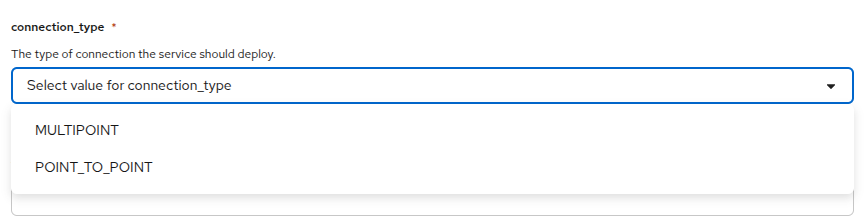
In cases where you only want to suggest values and allow other values that are not suggested: suggested values can be used. It exists in two flavors.
The first flavor uses a static list defined in the model. The following example adds a number of suggestions to a field that accepts a cron like expression. These are non trivial to write and having a number of command suggestions assists the user. It also still allows for a constrained string type with custom validation:
entity Service extends lsm::ServiceBase:
    cron_type? restart_on_calendar = null
    lsm::attribute_modifier restart_on_calendar__modifier = "rw+"

    dict restart_on_calendar__annotations = {
      "web_suggested_values": {
        "type": "literal",
        "values": ["*-*-* 00:00:00", "Sun *-*-* 00:00:00", "*-*-01 00:00:00"],
      },
    }
end
This results in a form control like this, that also provide search and autocompletion:
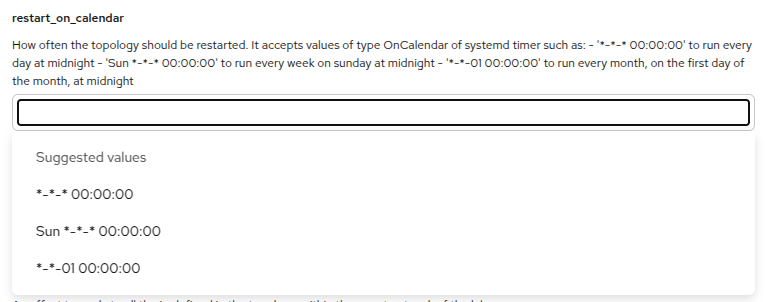
The annotation that controls this is web_suggested_values which as a value also needs a dict with two fields:
typewhich has to beliteralvalueswhich is a list of values that the web console should suggest to the user. Each entry is a string, or a{"label": ..., "value": ...}object when the displayed label should differ from the submitted value (see Separate label and value).
Because they are defined as a default value in the model, you can only provide literal strings here. It is not possible to generate the list using a plugin. The second flavor offers dynamic suggested values based on a parameter in the orchestrator API.
It is possible to have the web console load the list of values from a parameter registered in the orchestrator. These parameters can then be populated by the compiler or any other external system that has access to the orchestrator. The following example is taken from a service that supports a number of topology files that are part of a folder in an inmanta module. When the orchestrator compiles the model, it updates the list based on what is available in the module. This is defined as follows:
entity Service extends lsm::ServiceBase:
    string topology_file
    lsm::attribute_modifier topology_file__modifier = "rw+"
    dict topology_file__annotations = {
        "web_suggested_values": {
            "type": "parameters",
            "parameter_name": "topology_files",
        },
    }
This results in a form control like this, which also provides search and autocompletion:
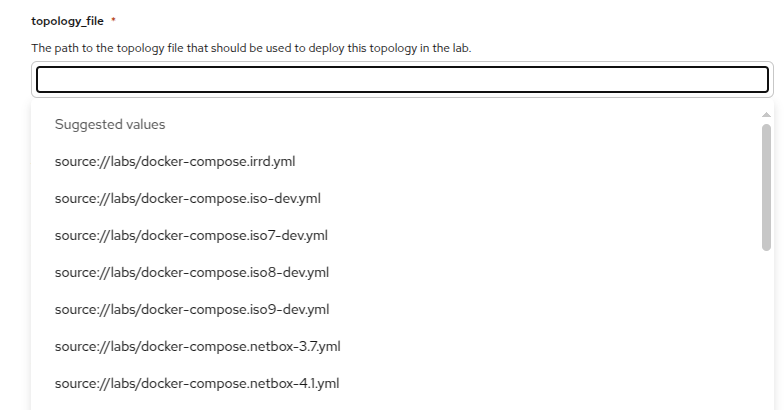
The suggested values are uploaded by adding the following code to the compiler:
import lsm

# Set the suggested values for the topology files
lsm::set_suggested_values(
    "topology_files",
    custom_module::all_matching_files("docker-compose.*.yml"),
)
The annotation that is required is also web_suggested_values which is also a dict that requires two fields:
typewhich has to beparametersparameter_namewhich points to the parameter name in our parameter API endpoint.
The values are expected by the frontend in the metadata field of the parameter under the values key. For the example above
the API returns the following structure:
[
    {
        "id": "1b0b1d37-abef-4e5f-8100-84ebf4c65f93",
        "name": "topology_files",
        "value": "metadata",
        "environment": "f81be80b-8582-499f-b002-7cdd2f2df98a",
        "source": "user",
        "updated": "2025-03-14T13:23:11.475925+00:00",
        "metadata": {
            "values": [
                "source://labs/docker-compose.irrd.yml",
                "source://labs/docker-compose.iso-dev.yml",
                "source://labs/docker-compose.iso7-dev.yml",
                "source://labs/docker-compose.iso8-dev.yml",
                "source://labs/docker-compose.iso9-dev.yml",
                "source://labs/docker-compose.netbox-3.7.yml",
                "source://labs/docker-compose.netbox-4.1.yml",
            ]
        }
    }
]
The lsm::set_suggested_values plugin takes care for wrapping the values and setting the value correctly.
Separate label and value
By default each suggested value is a single string that is both shown to the user and submitted as the
attribute value. When the value the model needs is not what a human wants to read (a UUID, an id, a
source:// URI, an internal code), an entry can instead be an object with a label and a value: the web
console shows and searches on label, and submits value.
This works for both flavors, and a plain string entry is shorthand for an entry whose label equals its value, so existing suggestions keep working unchanged.
For the literal flavor the objects are placed directly in values:
entity Service extends lsm::ServiceBase:
    string bandwidth
    lsm::attribute_modifier bandwidth__modifier = "rw+"
    dict bandwidth__annotations = {
        "web_suggested_values": {
            "type": "literal",
            "values": [
                {"label": "1 Gbps", "value": "1000"},
                {"label": "10 Gbps", "value": "10000"},
            ],
        },
    }
end
This results in a control that shows the labels while submitting the underlying values:
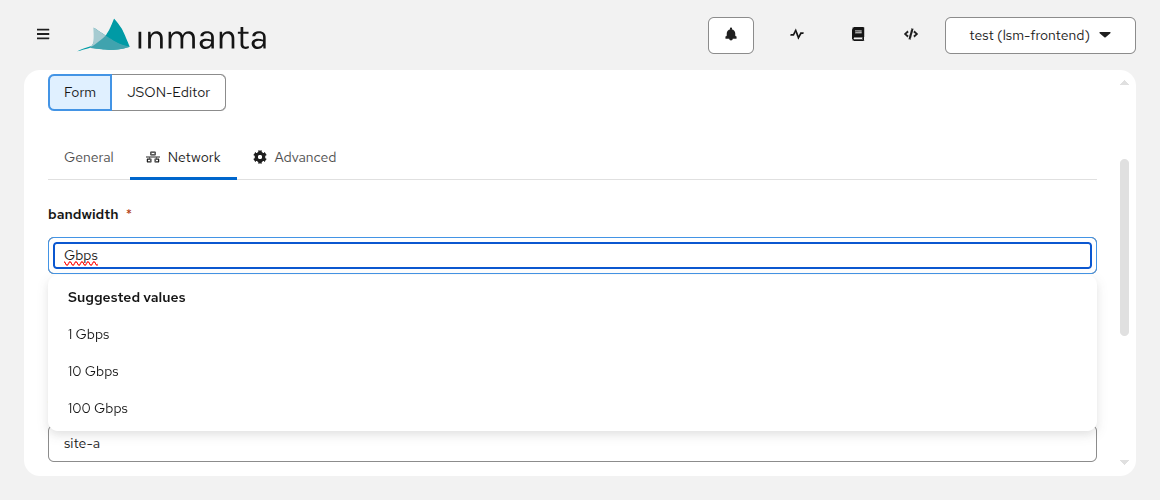
For the parameters flavor the same object form is allowed in the parameter’s metadata.values list.
lsm::set_suggested_values accepts either plain strings or {"label": ..., "value": ...} dicts and stores
them unchanged:
lsm::set_suggested_values(
    "bandwidths",
    [{"label": "1 Gbps", "value": "1000"}, {"label": "10 Gbps", "value": "10000"}],
)
Variables in the parameter name
For the parameters flavor, the parameter_name may contain placeholders that the web console substitutes
from the context of the form it is rendering. This lets a single annotation point at a per-entity or
per-instance parameter instead of one shared parameter for the whole environment.
Variable |
Substituted with |
|---|---|
|
The name of the service entity, as used in the service catalog and API paths. |
|
The current value of the service’s identifying attribute. |
|
The id of the instance being edited (empty while creating a new instance). |
|
The id of the environment the form is rendered in. |
entity Service extends lsm::ServiceBase:
    string topology_file
    lsm::attribute_modifier topology_file__modifier = "rw+"
    dict topology_file__annotations = {
        "web_suggested_values": {
            "type": "parameters",
            "parameter_name": "topology_files_${entity_type}",
        },
    }
end
The compiler (or any external system) then publishes the values under the resolved name. For a service
registered as my-service the example above reads the parameter topology_files_my-service:
lsm::set_suggested_values(
    "topology_files_my-service",
    custom_module::all_matching_files("docker-compose.*.yml"),
)
A few things to keep in mind:
A variable that has no value yet (for example
${instance_id}on a creation form) results in no suggestions until it has a value, rather than fetching an incomplete parameter name.Because
${identifying_attribute}reflects a value the user is still typing, the web console waits for the input to settle and then re-queries.A placeholder that is not one of the variables above is reported as an error on the field.
The same variables are allowed in the values of a
graphqlfilter, described below.
Values from a GraphQL query
The third flavor, graphql, lets the web console query the orchestrator’s GraphQL API when it renders the
field. Unlike the parameters flavor, nothing has to be uploaded up front and the suggestions cannot go
stale: they are whatever the orchestrator returns at that moment.
entity Service extends lsm::ServiceBase:
    string? environment_ref = null
    lsm::attribute_modifier environment_ref__modifier = "rw+"
    dict environment_ref__annotations = {
        "web_suggested_values": {
            "type": "graphql",
            "query": {
                "root": "environments",
                "label": "$.name",
                "value": "$.id",
            },
        },
    }
end
The query dict takes the following fields:
root: the GraphQL root to query, for exampleenvironmentsorresources. Required.value: a path into each returned node, giving the value that is submitted. Required.label: a path into each returned node, giving the label that is shown. When it is omitted, the value is shown as well, the same way a bare string works in the other two flavors.filter: narrows the query. Optional, but some roots require one.
The keys of filter are fields of the GraphQL schema, written in camelCase, and a nested input is a nested
dict. They are not paths: a dotted filter key is reported as an error on the field. Filtering, searching
and paging are performed by the orchestrator, so a large inventory is never pulled into the browser to be
filtered there.
label and value are jsonpath expressions, evaluated against each returned node. They are restricted to
plain navigation: member access, array index and a single equality filter. A leading $ is optional, so
$.name and name are the same path. Wildcards, slices and recursive descent are rejected, because such a
path selects many nodes where exactly one value is needed.
The values inside filter may use the same ${...} variables as a
parameter name. ${environment} is the useful one here, because several roots are scoped to an
environment:
entity Service extends lsm::ServiceBase:
    string? resource_ref = null
    lsm::attribute_modifier resource_ref__modifier = "rw+"
    dict resource_ref__annotations = {
        "web_suggested_values": {
            "type": "graphql",
            "query": {
                "root": "resources",
                "filter": {"environment": "${environment}", "resourceType": {"contains": ["%vm%"]}},
                "label": "$.resourceIdValue",
                "value": "$.resourceId",
            },
        },
    }
end
Fields that depend on another field
A ${...} reference can also point at another field of the same form, which makes the suggestions of one
field depend on what the user selects in another. This works for the parameters and the graphql flavor,
anywhere the other variables are allowed: in a parameter_name and in the values of a graphql filter.
Reference |
Resolved against |
|---|---|
|
The form as a whole, starting from its root. |
|
The embedded instance the annotated field itself belongs to. |
The path is a jsonpath, with the same navigational restriction as label and value above. In the example
below, the suggestions for uplink are filtered by whatever is selected in site:
entity Service extends lsm::ServiceBase:
    string? site = null
    lsm::attribute_modifier site__modifier = "rw+"
    dict site__annotations = {
        "web_suggested_values": {"type": "literal", "values": ["brussels", "antwerp", "ghent"]},
    }

    string? uplink = null
    lsm::attribute_modifier uplink__modifier = "rw+"
    dict uplink__annotations = {
        "web_suggested_values": {
            "type": "graphql",
            "query": {
                "root": "resources",
                "filter": {"environment": "${environment}", "resourceIdValue": {"contains": ["%${form.site}%"]}},
                "label": "$.resourceIdValue",
                "value": "$.resourceId",
            },
        },
    }
end
As long as site has no value, the uplink control is disabled and offers no suggestions. Once a site is
chosen the query runs, and when the site changes the query runs again and a selection that is no longer
valid is cleared.
The difference between the two references matters for embedded entities. ${form.<path>} always starts at
the root of the form, so every embedded instance sees the same value. ${self.<path>} stays inside the
embedded instance the annotated field belongs to, so the second endpoint in a list depends on its own
region rather than on the region of the first:
entity Endpoint extends lsm::EmbeddedEntity:
    string? region = null
    lsm::attribute_modifier region__modifier = "rw+"
    dict region__annotations = {
        "web_suggested_values": {"type": "literal", "values": ["north", "south"]},
    }

    string? interface = null
    lsm::attribute_modifier interface__modifier = "rw+"
    dict interface__annotations = {
        "web_suggested_values": {
            "type": "graphql",
            "query": {
                "root": "resources",
                "filter": {"environment": "${environment}", "resourceIdValue": {"contains": ["%${self.region}%"]}},
                "label": "$.resourceIdValue",
                "value": "$.resourceId",
            },
        },
    }
end
A few things to keep in mind:
A
selfreference does not search outwards. When the path does not exist inside the embedded instance, that is an error in the model, not a lookup in the parent.The dependencies between fields must not form a cycle. Two fields that reference each other are reported as an error on the form rather than queried forever.
The web console reports a reference to a field that does not exist, and a dependency cycle, as an alert on the form itself, because they are not tied to a single control. A path it cannot evaluate and an unknown variable are reported on the field that carries the annotation.
Form tabs
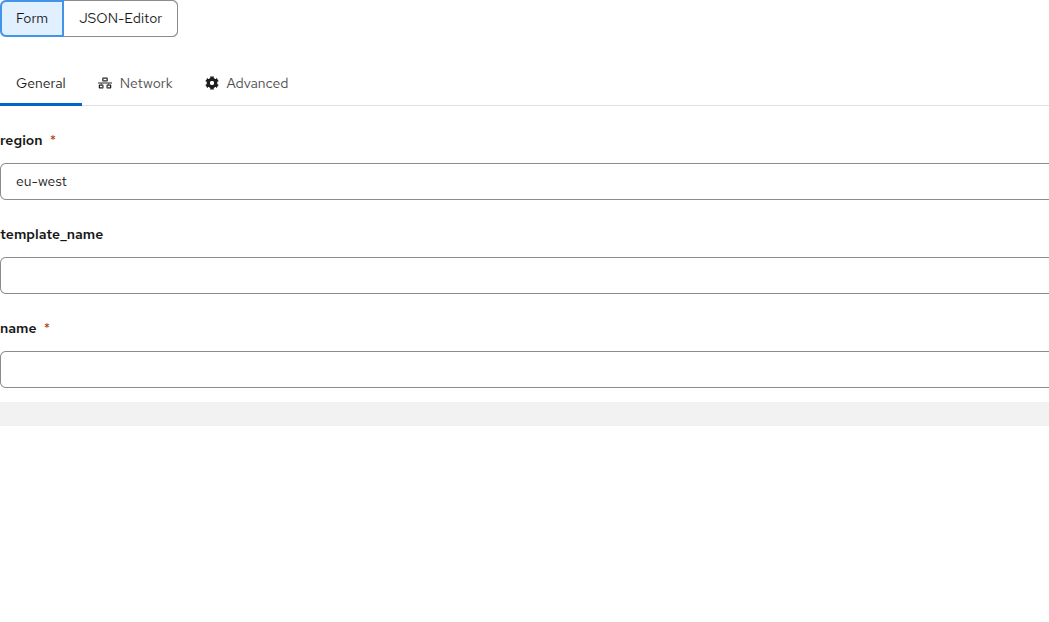
Large service forms can be split into tabs so that the create and edit forms stay navigable. This is controlled by two annotations: a catalog of tabs on the entity, and a per-field assignment to a tab.
The catalog is a web_tabs annotation on the service entity, listing the tabs. Each tab is a dict with the
following fields:
key: the identifier that fields refer to.label: the tab title shown in the web console.order: an integer that fixes the display order of the tabs (ties fall back tokey). The order does not depend on the position in the list.default: exactly one tab must setdefaulttotrue. It is shown first and receives every field that is not explicitly assigned to a tab.icon: optional font awesome icon name (the same convention as the documentation tab).
A field is assigned to a tab with a web_tab annotation whose value is a tab key. This works on a simple
attribute and on a relation; assigning the relation to an embedded entity places that whole embedded
sub-form on the tab.
entity Service extends lsm::ServiceEntity:
    dict __annotations = {
        "web_tabs": [
            {"key": "general", "label": "General", "order": 1, "default": true},
            {"key": "network", "label": "Network", "order": 2, "icon": "FaNetworkWired"},
        ],
    }

    string name
    lsm::attribute_modifier name__modifier = "rw"

    string bandwidth
    lsm::attribute_modifier bandwidth__modifier = "rw+"
    dict bandwidth__annotations = {"web_tab": "network"}
end
The web console renders the form with a tab per catalog entry:
A relation is assigned to a tab through lsm::RelationAnnotations, the same mechanism used for
annotations on relational attributes:
__endpoints__ = lsm::RelationAnnotations(annotations={"web_tab": "network"})
Service.endpoints [0:] __endpoints__ Endpoint._service [1]
A few things to keep in mind:
Tabs are top-level only.
web_tabsis honored on the service entity, andweb_tabon its top-level attributes and relations. Aweb_taborweb_tabsdeeper in an embedded tree has no effect.The
namefield above carries noweb_tab, so it lands on thedefaulttab (general).A service that defines no
web_tabsis rendered as a single form, exactly as before.